

Blog
Best MT4 Indicator for Beginners in 2026 — Simple, Tested, Honest Guide


Opening MetaTrader 4 for the first time is overwhelming. Dozens of built-in indicators, hundreds of custom tools available to download, and no clear starting point. Most beginners either add too many indicators — turning their chart into unreadable noise — or choose the wrong one entirely and lose confidence before they’ve given trading a fair try.
This guide cuts through that confusion. We explain which MT4 indicators are actually worth learning as a beginner, how each one works, what settings to use, and — critically — where each tool’s limits are. We also cover the point at which a purpose-built buy/sell signal indicator becomes a better choice than assembling your own combination from scratch.
Trading success in 2026 isn’t about more indicators — it’s about using two or three tools to confirm price action. Simplicity always outperforms a cluttered chart. That principle runs through every recommendation in this guide.
MT4
MetaTrader 4 platform
★
Beginner-friendly
FREE
Built-in + custom options
$
From $15.99 (Alpha)
The #1 Mistake Beginners Make with MT4 Indicators
Before covering which indicators to use, it’s worth understanding the most common trap new traders fall into — because it costs most of them their first account before they’ve even learned anything useful.
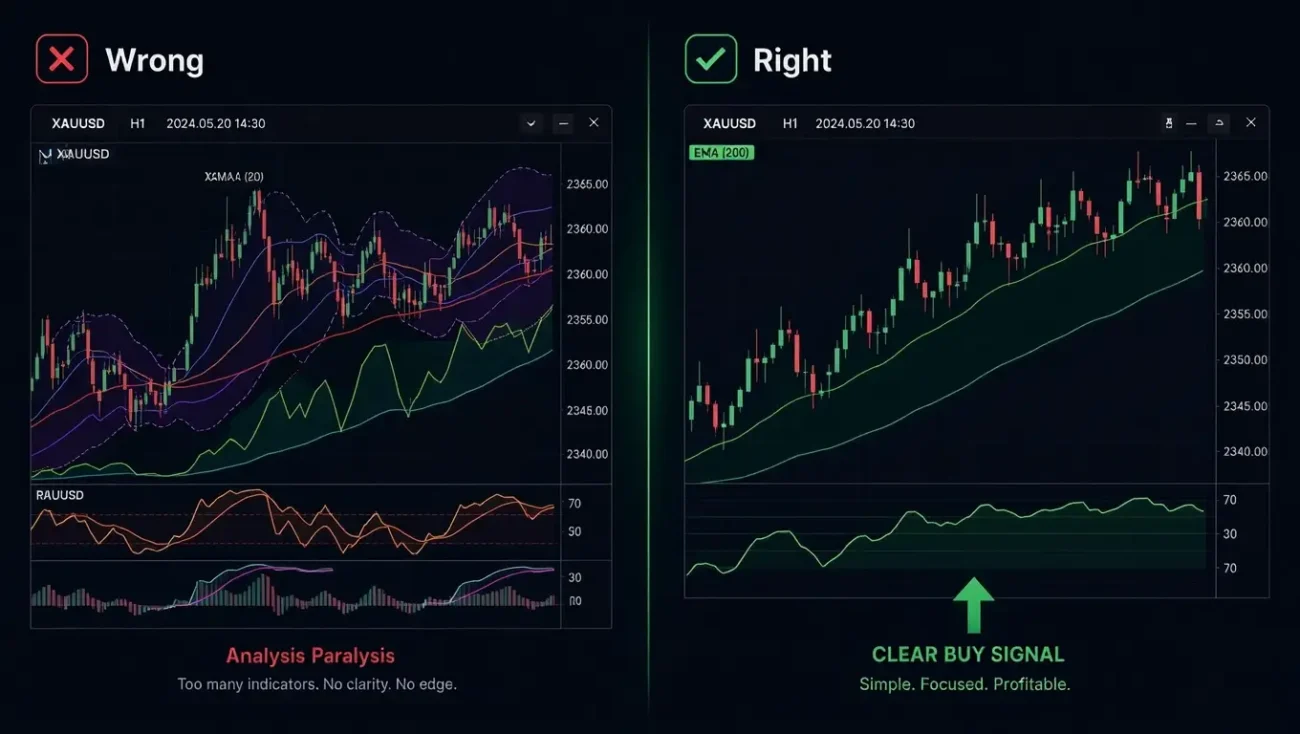
The mistake is indicator stacking: adding more and more tools to a chart looking for certainty. A Moving Average, then RSI, then MACD, then Bollinger Bands, then Stochastic, then a custom arrow indicator on top. The result is a chart where every indicator is confirming a slightly different thing, signals conflict with each other, and the trader is paralysed — or worse, cherry-picks whichever indicator happens to agree with what they already want to do.
A clean chart with strong price action and a few trusted indicators usually works better than a cluttered screen full of noise. The framework for beginners should be: one trend indicator, one momentum indicator, and one clear entry signal. Nothing more until those three are fully understood.
Best MT4 Indicators for Beginners — The Honest Ranking
These are the most reliable starting points for beginners on MetaTrader 4 — ranked by how easy they are to understand, how actionable their output is, and how likely they are to build good trading habits rather than bad ones.
Moving Average (MA)
The Moving Average is the most widely used indicator in existence. It smooths out price data to show the overall trend direction. Standard settings: 20-period MA for short-term momentum and 200-period MA for long-term trend. When price is above the 200 MA, the market is broadly bullish. When it’s below, treat long trades with caution.
For beginners, the Moving Average does one thing extremely well: it tells you whether you should be looking for buys or sells. This single filter eliminates the most common beginner mistake — taking buy signals in a downtrend and sell signals in an uptrend.
✓ Simple and visual
✓ Works on all pairs and timeframes
✗ Lags — confirms trend after it starts
✗ No entry signals or TP/SL levels
RSI (Relative Strength Index)
RSI measures momentum on a scale from 0 to 100. Above 70 = potentially overbought, meaning a pullback may be coming. Below 30 = potentially oversold, meaning a bounce may be coming. Use the default 14-period setting. Don’t trade RSI signals in isolation — use it to confirm or question what the chart is already telling you.
Paired with the 200 EMA, RSI becomes significantly more powerful: only take RSI buy signals when price is above the 200 EMA, and only take RSI sell signals when price is below it. This single rule eliminates a large percentage of false signals that catch beginners off guard.
✓ Easy to read at a glance
✗ False signals in strong trends
✗ No TP/SL or alerts
MACD
MACD (Moving Average Convergence Divergence) is a trend-following momentum indicator that shows the relationship between two moving averages. It is calculated by subtracting the 26-period EMA from the 12-period EMA. When the MACD line crosses above the signal line, it indicates building bullish momentum. When it crosses below, bearish momentum is building.
MACD is best used as a confirmation tool, not an entry signal in isolation. Pay special attention to MACD divergence — when price makes a new high but MACD doesn’t, that’s a warning signal. This divergence concept is one of the most reliable leading signals available on MT4 and is worth learning early.
✓ Divergence signals are powerful
✗ Lags on short timeframes
✗ Requires interpretation — not a simple arrow
Bollinger Bands
Bollinger Bands show price volatility using a middle moving average and two outer bands. When the bands tighten into a squeeze, a significant move is building. When price touches the upper band, it may be extended. For beginners, the band squeeze is the most valuable signal — it tells you a breakout is coming before it happens, giving you time to prepare rather than react.
✓ Great for spotting volatility expansions
✗ No directional bias — doesn’t tell you which way price will break
✗ Needs RSI confirmation
Alpha Indicator (Custom .ex4)
Once you understand the basics above, the logical next step is a purpose-built buy/sell signal indicator — one that has already done the combination work for you. The Alpha Indicator is a custom .ex4 file that installs into your MT4 in under two minutes and outputs a single, clear result: a green buy arrow or a red sell arrow, with automatic Take Profit and Stop Loss levels already plotted on the chart.
For beginners, this solves the core problem: instead of reading three separate indicators and trying to reconcile conflicting signals in real time, you get one output. You still need to understand risk management and position sizing — but the signal interpretation step is done for you by the indicator’s Market Structure logic.
Single clear signal — buy or sell arrow
Automatic TP & SL — no manual calculation
Non-repainting — signal stays fixed at close
24/7 support + full setup guide included
Gold, Forex & Crypto — all pairs
From $15.99 · Delivered in 24 hours
MT4 Indicators for Beginners — At a Glance
| Indicator | Type | Difficulty | TP/SL | Best for |
|---|---|---|---|---|
| Moving Average | Trend filter | Easy | Manual | Direction bias |
| RSI (14) | Momentum | Easy | Manual | Overbought/oversold |
| MACD | Trend + momentum | Medium | Manual | Confirmation + divergence |
| Bollinger Bands | Volatility | Easy | Manual | Breakout prep |
| Alpha Indicator ⭐ | Structure + Signal | Easy | Automatic | Complete signal solution |
Recommended Beginner Setup for MT4 — Step by Step
If you’re starting with free built-in indicators, here is the exact setup we recommend for beginners on MT4 — tested across major forex pairs and Gold on a demo account:
Before trading live, always test your setup in a demo account to see how your stop-loss and take-profit levels behave in real-time market conditions. Most regulated brokers offer free unlimited demo accounts with real market spreads.
In MT4: Insert → Indicators → Trend → Moving Average. Set Period to 200, MA Method to Exponential. Colour it clearly. From now on, only look for buy setups when price is above this line and sell setups when price is below it.
Insert → Indicators → Oscillators → Relative Strength Index. Period 14. Only act on RSI readings below 30 (potential buy) when above the 200 EMA, and RSI readings above 70 (potential sell) when below it. Do not take signals against the EMA bias.
Use a fixed risk percentage per trade — ideally 1–2% of your account — and maintain at least a 1:2 risk-reward ratio. Always place stop-loss orders. Calculate your lot size based on the distance to your stop, not a fixed number of lots.
H1 gives beginners enough time to think between signals and filters out the majority of false moves that dominate very short timeframes. Once you’re consistently profitable on H1 over at least 30 trades on demo, consider moving to shorter timeframes.
When Should a Beginner Upgrade to a Custom Indicator?
Built-in MT4 indicators are a valuable learning tool — but they have a structural limitation that most beginners run into within weeks: they require you to interpret multiple signals simultaneously and reconcile them under live market conditions. That’s a cognitive load that directly leads to second-guessing, late entries, and inconsistent execution.
A custom buy/sell signal indicator resolves this. Here’s a simple decision framework for when the upgrade makes sense:
- You’re still learning how indicators work
- You haven’t yet opened a demo account
- You haven’t made 30+ trades on demo
- You don’t yet understand position sizing
- You understand basics but want cleaner signals
- You’re consistently second-guessing your entries
- You want automatic TP/SL on every trade
- You want to trade Gold (XAUUSD) seriously
All MT4 Indicators →
Gold Indicators →
Best Buy Sell Indicators →
MT4 vs MT5 Guide →
Frequently Asked Questions
The Bottom Line
Start with the 200 EMA and RSI on H1 — on demo — and do not move until you understand what each signal means and have completed at least 30 trades. When you’re ready to upgrade, the Alpha Indicator is the clearest next step: a purpose-built buy/sell signal tool for MT4 and MT5 with automatic TP/SL, non-repainting signals, and 24/7 support. It starts at $15.99 with 24-hour delivery.
Risk Disclaimer: Trading Forex and financial markets involves substantial risk of loss and is not suitable for all investors. Beginners should always practice on a demo account before trading with real money. Past performance and signal accuracy figures do not guarantee future results. The Alpha Indicator is a decision-support tool — it does not replace proper risk management, a trading plan, or professional financial advice. Trade responsibly.